Cage Cards
Cage cards display the mice per cage. You sort the columns per cage individually. Filters can be applied by strain, breeding cages, and cage number. The latter accepts multiple numbers separated by comma.
The gray badge at the top right corner of each cage shows the number of male and female mice.
Regular cages show the columns tag, punch, sex, genotype, and age in months. Breeding cages also show the columns for set up, pregnancy date, litter date, wean date.
The page layout for cage cards adjust to the browser window size. Since breeding cages have more columns, you often see two regular cages but only one breeding cage per row.

Layout for Printing
The cage card view was designed with printing in mind because some mouse rooms don’t have internet connectivity. All the information you typically need in the mouse room can be printed on a few pages.
Neonates and Untagged
Therefore, neonates (i.e.,5 days or younger) are combined into one table row rather than having multiple rows with little information. They can still be dragged to a different cage at once. The same is true for untagged mice (i.e., older than neonates but still without tag).

Age Column
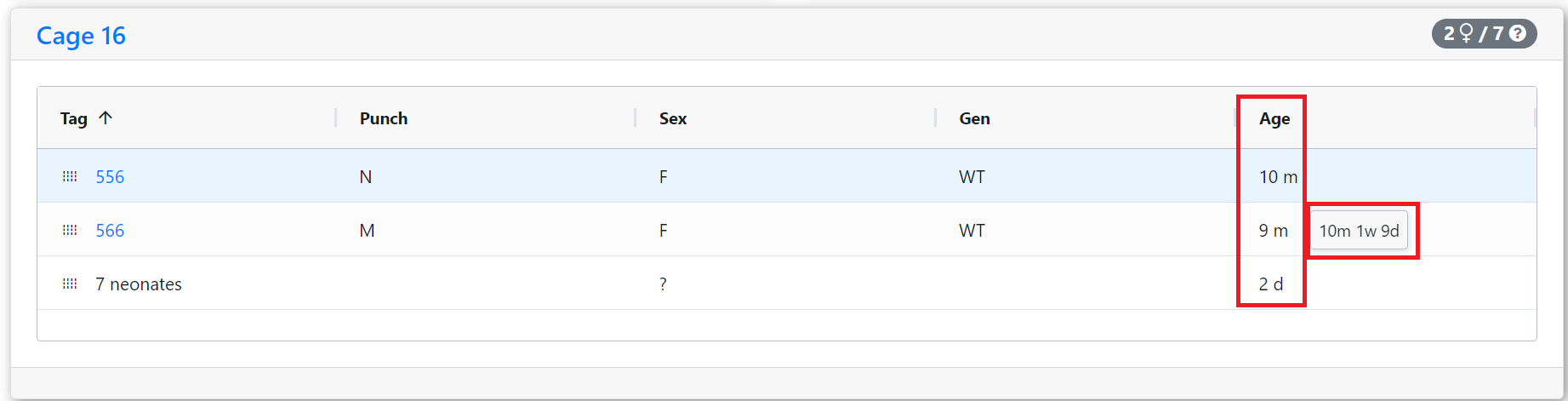
Rather than having two different age columns for months and weeks to choose from (as on the mouse table), the unit for the date columns adjusts to the age (i.e., days for neonates vs. weeks, months, or years for older mice). It only shows the most significant unit.
For example, 4 months, 1 week, and 8 days is displayed as 4 m. When hovering the mouse pointer over the age cell, it shows the details (e.g., 4m 1w 8d).
When printing cage cards, click on the print icon at the top right rather than using right click print in order to adjust the layout for printing.