View Litters
When breading mice, it is important to keep track of things like how many litters a female already had, when she had her last litter, or which pups were part of a particular litter. The litter view provides all this information. As with the mouse view, you can filter by column.
There are three types of litter:
- Weaned: when pups are weaned, they are usually tagged and ear punched. Their sex and genotype are determined, and they are moved to a different cage.
- Unweaned: pups can be entered into Mouse-Cloud before they are weaned. Their sex and genotype may or may not be known. They typically don’t have a tag or ear punch yet, and are kept in their mothers cage.
- Neonatal: sometimes only the number of pups needs to be tracked even before the sex is determined (e.g., if sacrificed soon).
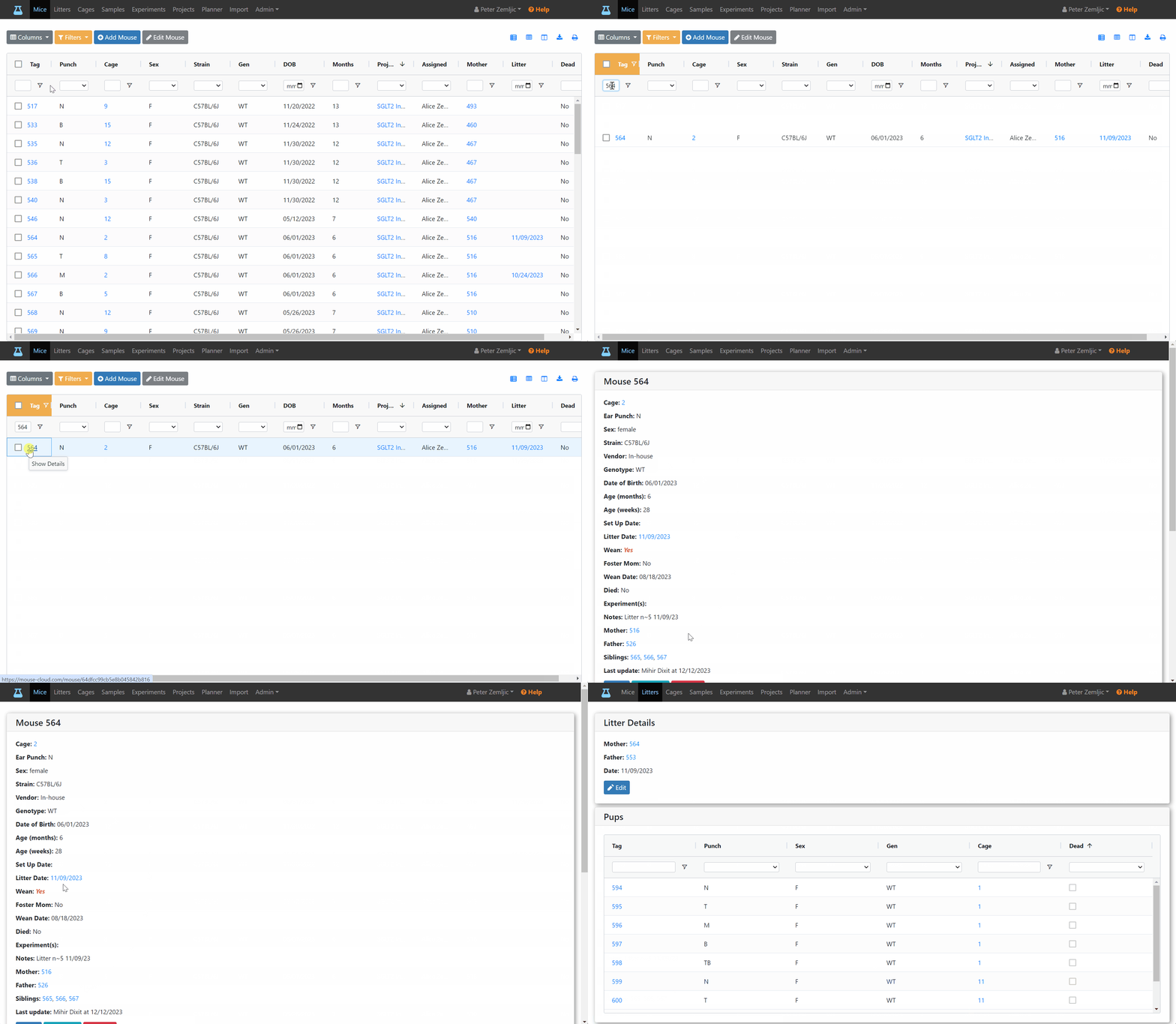
Let’s assume we’d like to look up the details for the last litter of mouse #564. This can be done on the litters table:
- Click on Litters at the top.
- Type the tag number 549 into the filter field of the mother column.
- Click on the most recent litter date (for multipel litters you can sort by descending date).

If the pups haven’t been weaned yet, the mother has a litter date which is visible on the mouse table (assuming the litter column was selected to be visible). Clicking on this date, also takes you to the details view of the most recent litter.

The same is true for the mouse detail view.